Blog
Can AI even read your casino site?
By Olesia Korobka · Updated 18 June 2026
To get more visibility in AI bots and even attract some traffic from them to your website, you need to make your website accessible and readable for them. If major AI bots cannot access your content or understand it properly, you are in trouble. Most of the iGaming websites I checked, had three basic issues:
- Content rendered with JavaScript. The page looks complete in a browser but arrives almost empty to bots that do not run scripts.
- robots.txt blocking AI crawlers. The bots that fetch pages for AI answers are disallowed, often without anyone deciding to.
- Cloudflare blocking AI bots. A one-click setting, often on by default, turns AI crawlers away before they reach the page.
Does your content load without JavaScript?
Open a key page and press Ctrl and U (or Cmd, Option and U on a Mac) to see the raw HTML your server sends. Search it for a game name or a bonus headline. If those words are not there, the content is drawn by JavaScript after the page loads, and the crawlers behind AI answers do not run JavaScript. They read the empty shell and leave.
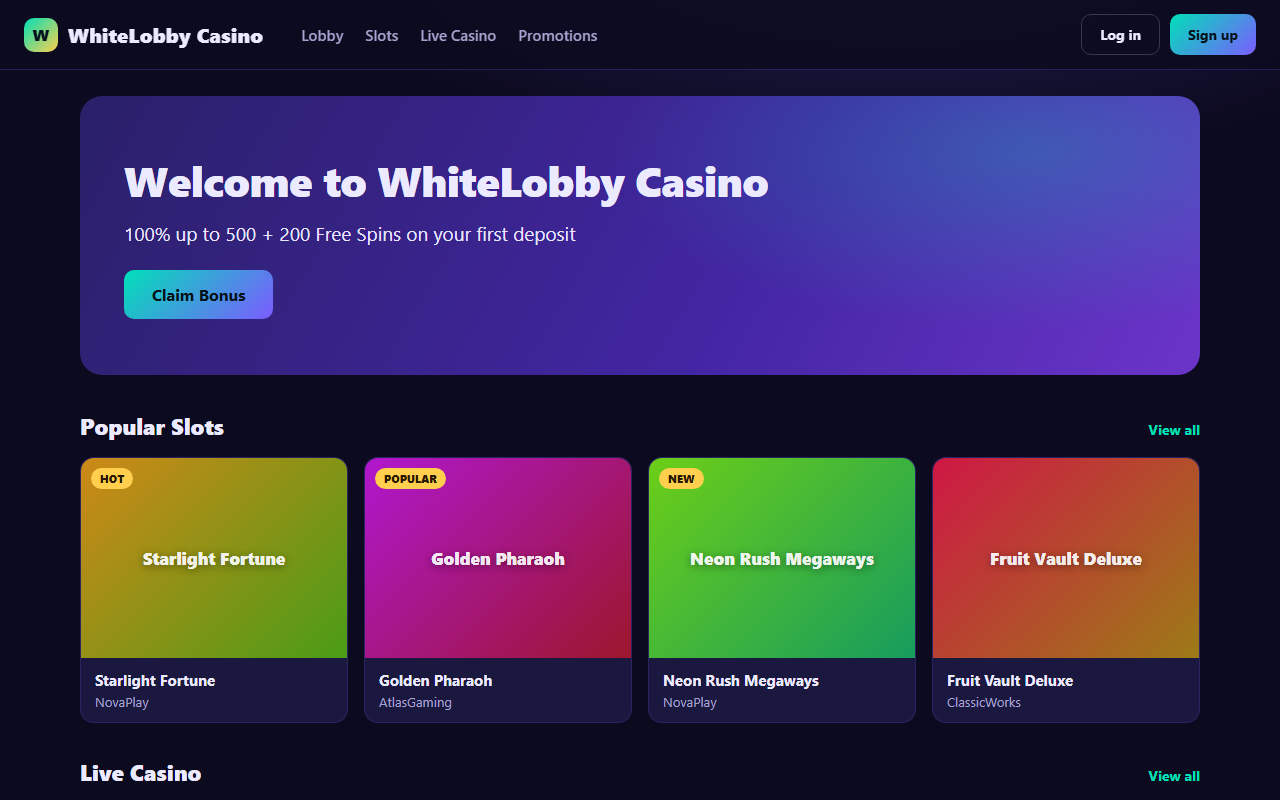
Here is the entire HTML that same page sends to a crawler that does not run JavaScript. No games, no bonuses, just one generic title and an empty container.
<!doctype html>
<html lang="en">
  <head>
    <title>WhiteLobby Casino</title>  <!-- the only title, identical on every page -->
    <script type="module" src="/assets/index.js"></script>
  </head>
  <body>
    <!-- the whole page a crawler receives; real content is injected by JavaScript -->
    <div id="root"></div>
  </body>
</html>
This is the most common issue we find. In our AI visibility audit for a crypto casino brand, the biggest access problem was exactly this. The site rendered its content with JavaScript, so the answer engines read an empty page and had nothing to quote.
The fix is to render your public pages on the server or pre-build them, so the full text is in the HTML before any script runs. Login, wallet, and gameplay can stay dynamic. It is the public, factual pages, your games, bonuses, payments, and licensing, that have to arrive as real HTML.
Is robots.txt blocking the AI crawlers?
Open yourdomain.com/robots.txt and read it for two things. Disallow lines that touch your public pages, and AI user-agents that are blocked outright. There are two kinds of AI bot, and the difference matters. Training crawlers such as GPTBot, Google-Extended, and ClaudeBot collect data to train models. Citation crawlers such as OAI-SearchBot, ChatGPT-User, PerplexityBot, Claude-User, and Googlebot fetch your page to answer a live question and link back to you. Block the training group if you want. Blocking the citation group is what removes you from the answers.
# Let the citation crawlers reach public pages
User-agent: Googlebot
User-agent: OAI-SearchBot
User-agent: ChatGPT-User
User-agent: PerplexityBot
User-agent: Claude-User
User-agent: Claude-SearchBot
Allow: /

# Keep the player session private
User-agent: *
Disallow: /account/
Disallow: /wallet/

Sitemap: https://your-domain.com/sitemap.xml
Is Cloudflare turning AI bots away?
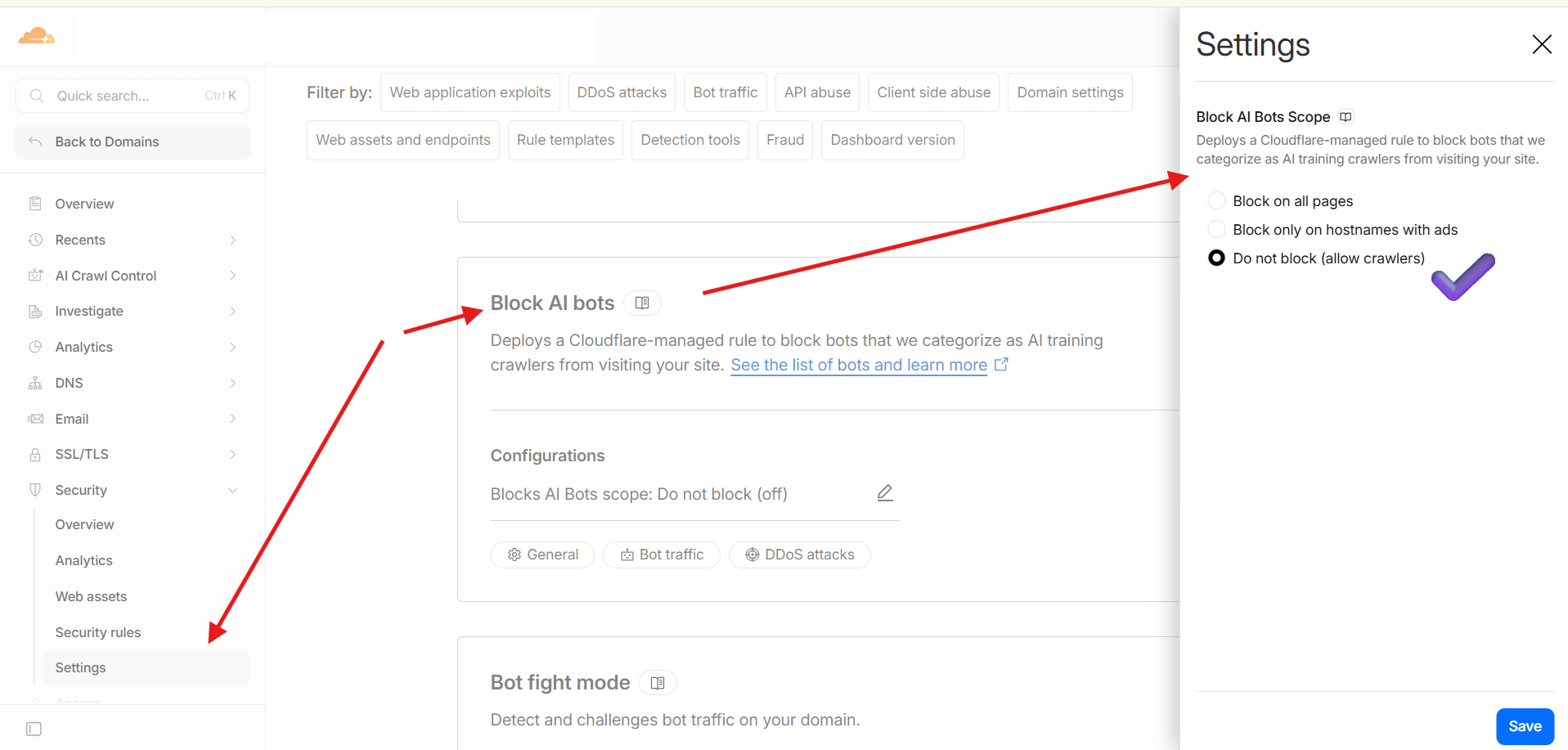
In Cloudflare the control sits under Security, then Settings, in a card called Block AI bots. It deploys a Cloudflare-managed rule that blocks the bots Cloudflare categorizes as AI crawlers, and it offers three scopes. Block on all pages, block only on hostnames with ads, or do not block. To stay readable in AI answers, set it to Do not block (allow crawlers). It is easy to leave on without realizing.
A WAF or custom firewall rule can block the same bots one layer further up, so a crawler you allowed can still be challenged there. A challenge page looks like an empty or broken page to a bot, so confirm the citation crawlers above receive a clean response and not a challenge.
Blocking AI bots feels like protecting your content. In practice it is the surest way to disappear from AI answers, because the bots it blocks are the same ones that fetch your page to cite it. Protect the player session, not the public facts.
How do you check all three in ten minutes?
- View source. Ctrl and U on a key page (Cmd, Option and U on a Mac), search for your real content. If it is missing, fix rendering first.
- Read robots.txt. Confirm the citation crawlers are allowed and public pages are not disallowed.
- Check Cloudflare. Turn off Block AI Bots if it is on, and confirm no firewall rule challenges the citation crawlers.
- Recheck. Fetch the page as a plain request and confirm a clean response with your content visible, then watch how the engines answer over the following weeks.
Video transcript
Visibility in AI answers such as ChatGPT, Google's Gemini, Perplexity, and Claude is a hot topic right now. I am getting numerous questions on how to get traffic, get cited, or at least some visibility in LLMs or Google's AI Overviews, which are getting more and more prominent, even in iGaming at the moment.
However, iGaming websites have a strange problem I have noticed many times. They want to be visible in Google, but very often the official website is built in a way that hides the most important content from the systems that need to access and read it. Often the website looks fine in a browser. Players can click around, the games appear, the lobby feels alive. But when a crawler or AI answer engine opens the same page, it may receive almost nothing.
So sometimes an easy fix to many visibility problems is ensuring your website is fully accessible and your content is fully visible. I will show you some common errors I have seen and how to fix them, and anyone can do that. You can identify the problem yourself without any technical knowledge.
To avoid naming and shaming anyone in particular, I created a placeholder casino website as a demo of the most common mistakes. At first glance it looks like a normal website, but the raw HTML shows what search engines and AI systems actually receive. Here you can click on mostly anything, and of course nothing really plays because it is not a real casino. There is live casino, some bonuses, some of the pages. It is just a placeholder to show the concept.
So I press Ctrl and U, and here you see the code of the homepage. You will see that most of the content, just for demonstration, is loaded from JavaScript. How do you actually check? Sometimes it is not that easy to spot. Go to your settings in Google Chrome, type JavaScript, go to settings, then to Sites that can use JavaScript, and choose Do not allow sites to use JavaScript. I set this website not to use JavaScript, and you can see the page is absolutely empty. That is what most of the bots receive.
It is not exactly how Google sees it, because in the Rich Results Test you can see that some content is actually loaded by Google. But that is the general Googlebot used for rich result snippets, and the AI bots do not really render JavaScript. It is a known, common problem.
Another problem I purposefully created on this website, which I will remove and show you how to fix, is that I blocked all the known AI bots in the robots file so they cannot access the website.
Another very common problem is your settings in Cloudflare, which many of you use. You go to the security settings on your website and scroll to Block AI Bots, and there is the configuration. In my case it is currently set to do not block, but on some pages it might be set to block, sometimes on all pages.
So here is what you need to check to ensure the most basic accessibility problems do not exist on your website. If your content is invisible, if your website is not accessible, you are not in control of your brand, and you are not in control of the answers AI gives about you. Consider fixing them.
So what I am going to do is fix this website right now. I will make it render without JavaScript and respond to AI bots normally. I will remove the robots.txt block and change it to a normal, static robots.txt, because sometimes a common problem is making it render every time it gets requested. On some websites it gets requested very often, so it stops responding and may be inaccessible. So make it static as well, and ensure you are not blocking it anywhere at all.
Sometimes you might also have WAF rules, so you might want to check those for blocked crawlers. And if you are on Apache, sometimes you may be blocking them in .htaccess too.
I think that is enough. I will be creating more videos like this to help you get more visibility. So subscribe, share, and ask your questions. We will be glad to hear from you. See you.
Not sure which side your site is on?
We check whether AI can read your brand, fix what blocks it, and make your own pages the source the engines cite across search and AI.
Book a discovery call or email hello@whitelobby.comRelated reading. An AI Visibility Audit for a crypto casino brand and how a brand took five of the top eight results on its own brand SERP. More on iGaming brand protection across search and AI.